
Architecture
How the box works: where things run, how a build travels from a CI job to a daemon and back, where the cache lives, and what happens during rollouts. The decisions behind it are in adr/.
Components and namespaces
Section titled “Components and namespaces”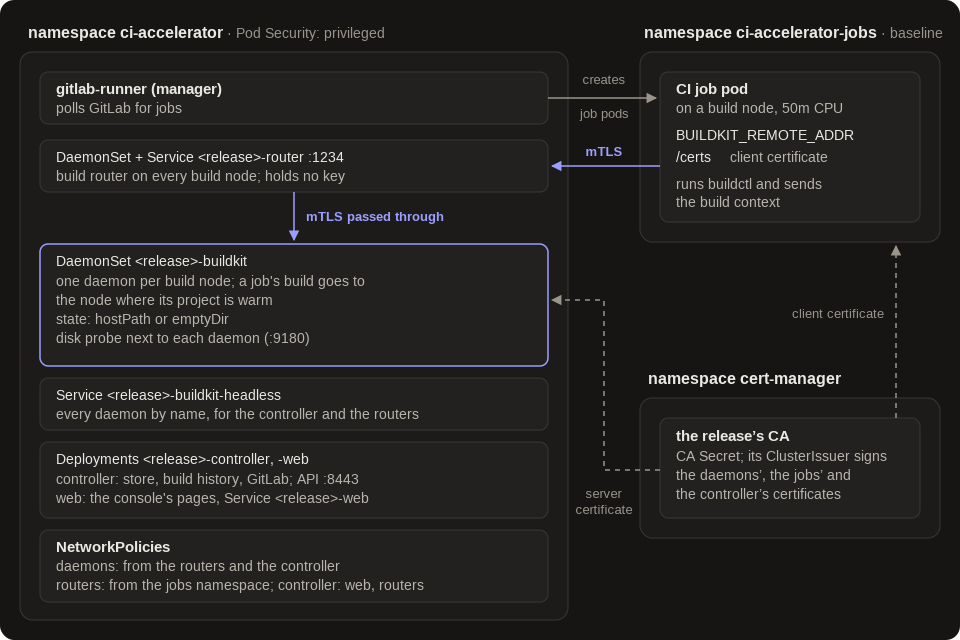
| Part | Where | Notes |
|---|---|---|
| buildkitd | DaemonSet <release>-buildkit on build nodes (ci-accelerator.io/node-role=build) |
Privileged, rootful; one per node; its own PriorityClass |
| Disk probe | A container in each daemon pod (on in the box) | The ci-accelerator image in its disk-probe role; reports the cache disk’s size and free space (statfs), and the node’s and the daemon pod’s CPU and memory, read from /proc and the pod’s cgroup every 10 s and kept for an hour (the host’s /sys/fs/cgroup is mounted read-only; the pod’s cgroup is found by its UID, on cgroup v2) |
| gitlab-runner manager | Box namespace, a node without the build taint | Polls GitLab, creates job pods |
| CI job pods | Jobs namespace, build nodes | Thin clients: buildctl and the build context |
| Build router | DaemonSet <release>-router on build nodes, Service <release>-router |
Passes each job’s connection to the daemon where its project is warm; holds no key, stores nothing |
| Controller | Deployment <release>-controller, one pod, box namespace |
Reads the daemons’ build history and the job pods; holds the store, the sessions and every GitLab token |
| Web | Deployment and Service <release>-web, two pods by default |
Serves the console’s pages, reading the controller’s API; keeps nothing |
| CA, server and client certificates | cert-manager | The CA lives in cert-manager’s namespace |
The router, the controller and the web are roles of one image,
ghcr.io/hoobiboobi/ci-accelerator, installed by the chart
control-plane (control-plane.enabled, on in the box). The router can
be switched off alone (global.router.enabled=false), and must be when
the control plane is off; the jobs then connect to the daemons’ own
Service.
The jobs namespace is separate because job pods run untrusted code and the runner needs broad rights there; the daemons’ keys must not be in reach (ADR-0010).
Priority and resources. The kubelet evicts pods under memory or disk
pressure that use more than they requested, in order of priority. The
daemons therefore have their own PriorityClass (<namespace>-<release>-buildkit,
value 1000000, preemptionPolicy: Never: above CI jobs, and never evicting
a running job to get scheduled) and default requests of 500m CPU and 512Mi
(ADR-0043). In the box the
routers run with the same PriorityClass: they carry the daemons’ builds.
The path of a build
Section titled “The path of a build”-
The runner creates a job pod in the jobs namespace, on a build node. It sets
BUILDKIT_REMOTE_ADDR=tcp://<release>-router.<namespace>.svc:1234and mounts the client certificate atBUILDKIT_TLS_DIR. (Withglobal.router.enabled=falsethe address is the daemons’ Service,tcp://<release>-buildkit.<namespace>.svc:1234.) -
buildctl buildconnects to the router on the job’s own node (trafficDistribution: PreferSameNode; another node’s router when it is not ready). That needs Kubernetes 1.34 or newer, and a service proxy that implementsPreferSameNode. The router knows the job by its pod’s address (it waits up to 3 s for a pod that has just started) and picks the daemon (ADR-0045):- the daemon on the job’s own node, if the project is warm there;
- else the ready daemon of the job’s zone where the project was warm most recently;
- else the project’s daemon by a rendezvous hash over the zone’s ready daemons: every router computes the same answer, so a new project’s parallel jobs meet on one daemon and BuildKit runs their common steps once;
- else, when the zone has no ready daemon, the hash over every ready
daemon (
control-plane.router.crossZone, on by default; off, the connection is refused). A node keeps its zone while its daemon is between pods; a node that never had a daemon (a runner tier on any node) has no known zone, so every daemon is in its zone.
Warm means the project built on that node within
control-plane.router.warmDays(7 by default), or a router sent one of its jobs there in the last hour. A build counts for its node even when the daemon pod has been replaced since, but only when the cache survives restarts (hostPath, which each daemon states in a worker label); otherwise only builds of the daemons running now count. The hash is keyed by node too, so a daemon’s restart does not move its projects.Zones are the
topology.kubernetes.io/zonelabels of the daemons’ nodes. Withcontrol-plane.router.zones: falseevery daemon counts as one zone (zones close enough that crossing them costs nothing, or a zone label per node).control-plane.router.overloadBuilds(0, off, by default) skips a daemon running that many builds when another one is free. A connection from a pod that is no CI job goes to the daemon on the router’s node (by hash when that one is not ready).The controller keeps the facts behind warmth; each router asks it for them every 5 s and keeps routing on its last view, plus its own decisions, while the controller does not answer. Each decision for a CI job is reported back: the build page says why its node was chosen, and each daemon’s page (
/nodes/<daemon>) counts the last 24 hours’ decisions by reason. -
Mutual TLS, end to end. The router passes the bytes through and holds no key. The client checks the daemon’s certificate, whose names cover the daemons’ Services and the router’s. The daemon requires a client certificate from the installation’s CA. Idle connections are kept alive (15 s, 3 probes), so a router notices a vanished peer.
-
The build runs in the daemon:
buildctlstreams the build context and Dockerfile from the job pod (across the network when the router chose another node’s daemon); with the CI component’scontext-source: gitthe job sends nothing: the daemon fetches the pipeline’s commit from$CI_PROJECT_URLitself, with the job token as a build secret, into one copy of the repository per remote that it keeps, and lays the commit out from there; the Dockerfile comes from the commit (ADR-0057);- the daemon resolves and pulls base images;
- it runs
RUNsteps in runc sandboxes; - it exports the result.
Registry credentials stay in the job: the daemon asks
buildctlfor them over the session when it pulls or pushes. -
The job only waits. It uses almost no CPU; that is why job pods get a small resource tier.
RUN steps run in the daemon pod’s network namespace (BuildKit’s host
network mode). They see the daemon’s localhost and leave the pod with the
pod’s IP, so the daemon’s NetworkPolicy also limits what builds can reach
(ADR-0019).
Network policies
Section titled “Network policies”The box renders these (a CNI that enforces NetworkPolicy is needed):
| Pods | Admit (ingress) | Egress |
|---|---|---|
| Daemons | The routers’ and the controller’s pods, on the TLS port and the disk probe’s port. Without the router: the jobs namespace instead | DNS to kube-dns, and anywhere except cloud metadata (169.254.169.254, fd00:ec2::254) and the CIDRs in buildkit.networkPolicy.egress.clusterCIDRs |
| Routers | The jobs namespace (control-plane.router.clientNamespaces) |
Not limited |
| Controller | The web’s and the routers’ pods, on the API port | Not limited |
| Web | Every namespace except the box’s own and the jobs namespace; in the box namespace, every pod except the daemons | Not limited |
A daemon that builds from a git context must reach the GitLab it fetches
from: with GitLab inside clusterCIDRs, add a rule for it in
buildkit.networkPolicy.egress.extraRules.
CI jobs therefore reach a daemon only through a router, and neither CI
jobs nor RUN steps can reach the controller’s API or the console’s
pages. kubectl port-forward still works.
Which daemon served a job
Section titled “Which daemon served a job”-
On the build page: the daemon and node of the build, and the router’s reason for choosing it.
-
In the router’s log: one
routedline per connection of a CI job, with the job, project, daemon, node and reason (in the router pod on the job’s node, or on another node when that one was not ready). The reasons, also on the build page and counted on each daemon’s page:Reason Meaning local-warmThe job’s own node, where the project is warm zone-warmThe node of the zone where the project was warm most recently zone-hashNowhere warm in the zone: the project’s node by hash cross-zoneNo ready daemon in the job’s zone A connection from a pod the router does not know as a CI job goes to the daemon on its own node (by hash when that node has none ready); it is logged as such, with its daemon, and not recorded.
-
From the job:
Terminal window buildctl --addr "$BUILDKIT_REMOTE_ADDR" --tlsdir "$BUILDKIT_TLS_DIR" debug workers -v \| grep -E 'hostname|ci-accelerator.io/node'prints
org.mobyproject.buildkit.worker.hostname: <daemon pod>and the daemon’s node. Through the router this is a connection of its own, routed like the job’s builds, so it normally names the same daemon. -
In metrics and traces (when they are sent to a backend): the labels
k8s.pod.nameandk8s.node.name.
The cache
Section titled “The cache”-
Per daemon. Each daemon has its own cache; nothing is shared between nodes. The router keeps a project on the node where it built before, so its cache warms up once (once per zone with
control-plane.router.zones); a job sent elsewhere (that daemon not ready, another zone) builds with the other daemon’s cache. Without the router, a job builds on its own node’s daemon, so a project warms up on every node its jobs land on. -
Shared between projects. Identical steps of different projects reuse each other’s layers, and cache mounts are shared (ADR-0046).
-
Whose it is: not known. BuildKit’s disk usage lists records without a build or project, so the console shows each node’s cache by kind (base images, build layers, cache mounts, contexts), not by project.
-
Persistence:
hostPath(production, on a dedicated disk): the cache survives restarts, rollouts and uninstall, and the router keeps sending a project to its node across them.emptyDir(the default, for trials and CI): the cache dies with the pod, and every rollout empties it; the router then forgets the replaced daemons’ builds.
-
Deduplication. Identical steps of concurrent builds on the same daemon run once, so parallel jobs of one pipeline share their common steps when they land on one daemon. The router sends a project’s parallel jobs to the same daemon while the project is warm on one node of the zone, or nowhere yet (the hash); once it is warm on several nodes, a job on one of them stays on its own node.
-
Garbage collection runs after builds (at most once a minute) and at start, not on a timer. The chart always renders the full policy set (ADR-0009):
Policy What it removes Build contexts and git checkouts Records unused for 48 h (while the whole cache is above 512 MB). A git context’s commit is laid out again from the daemon’s copy of the repository when its checkout was removed Cache mounts ( RUN --mount=type=cache)Records unused for 14 days ( config.gc.cacheMounts.keepDuration)Everything else (also a git context’s copy of the repository) Nothing by age alone. While the cache is above maxUsedSpaceor free disk is belowminFreeSpace: records unused for 60 days first, then the least recently used records, down to the caps but never belowreservedSpace- A size cap on a filtered policy is compared with the size of the whole cache, not with the filtered records.
- A policy with both an age and a cap removes only records older than
the age, and only while the cap is exceeded. So
config.gc.cacheMounts.maxUsedSpacekeeps cache mounts longer, not shorter, unlesscacheMounts.keepDurationis"0". - Sizes use BuildKit’s binary units:
10GBmeans 10 GiB.
Identity and certificates
Section titled “Identity and certificates”-
The CA. With cert-manager, the release creates a CA of its own unless you name an issuer. That CA is a self-signed issuer, a CA certificate that keeps its key on renewal, and a ClusterIssuer.
-
Leaf certificates, all from that CA:
- the daemons’ server certificate (Secret
<release>-buildkit-tls), naming the daemons’ Services and, with the router, the router’s Service<release>-router; - one client certificate in each jobs namespace
(
<release>-buildkit-client); - the controller’s client certificate for reading the daemons
(
<release>-controller-client); - the controller API’s server certificate (
<release>-controller-tls), for server authentication only.
They last a year and are renewed after two thirds. The router has no certificate: TLS passes through it. Without cert-manager,
scripts/buildkit-certs.shmakes them from a CA of your own (--router <release>adds the router’s names,--controller <release>makes the API’s certificate). - the daemons’ server certificate (Secret
-
Renewals need a restart. buildkitd reads its certificate only at start. The DaemonSet carries a Stakater Reloader annotation, so with Reloader in the cluster a renewed Secret triggers a rolling restart. Without it, restart the daemons before the old certificate expires (you have about four months after a renewal).
-
What the daemon accepts. It accepts any client certificate from its CA and checks nothing else about the client. The CA must therefore be dedicated to the installation. The controller API’s certificate cannot drive the daemons: it is not valid for client authentication.
-
Inside the control plane. The web and the routers prove who they are to the controller with a ServiceAccount token that Kubernetes projects into their pods for the audience
ci-accelerator-controller; the controller checks it with a TokenReview (its only cluster-wide right) and admits the web’s and the routers’ ServiceAccounts, each to its own part of the API.
Telemetry
Section titled “Telemetry”-
Pushed, not scraped. The daemons push metrics and traces over OTLP (http/protobuf by default) to your own backend, when
buildkit.otel.metricsEndpointandtracesEndpointare set. Nothing is stored in the box, and nothing is sent by default. The daemon’s debug HTTP server (/metricsnext to pprof and cache endpoints) is never enabled. -
Metrics. BuildKit currently exports three:
buildkit.builds(by status);buildkit.builds.steps(by kind: completed, cached, total, warnings);buildkit.build.duration.
The counters are deltas per push interval: whatever stores them must sum them over time, or convert them to cumulative counters first. Cache size and GC activity are not exported by BuildKit yet.
-
Traces. The runner configuration has a
pre_build_scriptthat runs in every job right before its script and exports:-
TRACEPARENT, one trace per job:- trace-id =
01(scheme version), 6 hex characters derived from the GitLab URL, the pipeline id and the job id (12 hex characters each); - parent span-id = the job id in hex.
Ids that are not numbers from 1 to 2^48-1 set nothing. A
TRACEPARENTthe job sets itself is kept. - trace-id =
-
OTEL_RESOURCE_ATTRIBUTESwith the pipeline id, job id and project path.
buildctlreads them and forwards its spans through the daemon, with no exporter in the job and no change to.gitlab-ci.yml. A job’s trace is found from its ids; a pipeline’s jobs by theci.pipeline.idattribute. One trace per job also keeps BuildKit’s build history clean: it attaches every span of a build’s trace id to the build’s record, so a trace shared by concurrent jobs would end up in each of their records (ADR-0028). The console uses the trace id to tie each build record to its pipeline and job; that needs no trace storage. The job itself is not a span yet: in a trace viewer the builds hang under a missing parent. Job pods also carry annotations underci-accelerator.io/with job data from GitLab’s CI variables: pipeline id, source and creation time, project path, job stage and start time, commit title and author, merge request. The runner adds the job id, name, URL, ref, commit and project id itself. An unset variable gives an empty value; a commit title reaches the pod as text, never expanded. -
The control plane and the console
Section titled “The control plane and the console”The control plane (chart control-plane) runs in the box namespace as
roles of one binary and image, ci-accelerator: controller, web,
router and disk-probe (all, controller and web in one process, is
for development) (ADR-0044). It changes
nothing on the daemons: the controller only reads them, and the router
only chooses where a connection goes.
- The controller (Deployment
<release>-controller, one pod,Recreate) owns everything with state: the store, the reading of the daemons and the job pods, the facts the routers route by, the sessions of people signed in and every GitLab token. Its API is HTTPS on the Service<release>-controller, port 8443. - The web (Deployment
<release>-web, two pods by default,control-plane.web.replicas) serves the console’s pages and JSON API on the Service<release>-web. It keeps nothing: it reads the controller’s API, so it scales and rolls without a pause, and a controller restart shows as an error page (502) for a moment, not a lost session. The writes the pages cause (GitLab’s answers, settled reasons, sessions) are done by the controller. - The routers (above) read the controller’s API for warmth and report their decisions to it; they watch the daemons’ EndpointSlices and the job pods themselves, with Roles limited to those.
What the controller does:
- Build history from the daemons. It finds the daemons through the
headless Service and reads each one’s build history over the daemons’
TLS port (1234), with its client certificate. The daemons’ NetworkPolicy
admits pods labelled
ci-accelerator.io/component: controller(never the web’s). - Disk and load from the disk probes. BuildKit reports what the cache
holds, not how much room its disk has left, nor what its node carries.
Once a minute, with each daemon’s inspection, the controller asks the
probe next to it (plain HTTP on the daemon pod’s address, on the port the
daemon states in a worker label, 9180 by default) for the size, free
space and inodes of the cache’s filesystem (
GET /disk) and for the node’s and the daemon pod’s CPU and memory with the last hour of readings (GET /load). The daemons’ NetworkPolicy opens that port to the same peers as the TLS port. The Nodes page shows the disk against BuildKit’s keep-free floor and the kubelet’s eviction thresholds, and the load as an hour’s chart; the node’s memory is total minus available, the pod’s its working set (the kubelet’s measure), so the two add up. - Running builds, while someone looks. A daemon announces each build
as it starts. The CI component passes the job’s TRACEPARENT as the build
option
ci-accelerator.io/traceparent, so the controller knows the build’s job from its start (a completed build’s job comes from its trace, which exists only at the end). When the job’s page or its pipeline’s page asks, the controller reads the build’s progress from the daemon (BuildKit’s Status stream, replayed from the build’s start) and keeps each step’s state and last 8 lines, secrets masked, for a minute after the last ask, at most 32 builds at once; the probe’s load of the build’s node is read every 10 s meanwhile. The pages compare the build with the last one of the same image that ran the same step, for how long the rest likely takes (ADR-0053). - Cache-mount hints, when a build page is read. Each step’s operation (command, environment, user, working directory, mounts) is kept in the store already; the controller reads it against a table of about thirty package managers and, for a step that runs one without a working cache mount, sums how long that step took in the image’s builds of the last 30 days (one indexed query per build). Nothing is stored for it, so the hints also cover builds stored before the feature (ADR-0058).
- Job data from the job pods. A Role in the jobs namespace lets it get, list and watch pods. The pods’ annotations tie each build to its pipeline, job, project and commit; the trace id ties the build record to the job.
- GitLab’s API, outbound and on demand. With a token
(
control-plane.gitlab.token) or with sign-in, it reads a pipeline’s jobs while someone looks at pipelines, and the end of a job’s log when someone asks for it. To settle “files or node” it compares two commits; it does that in the background too (with the installation’s token, at most 25 requests a minute per project) and stores GitLab’s comparisons, so a settled build stays settled across restarts. It waits when GitLab rate-limits. GitLab never needs to reach the console: there are no webhooks, and with sign-in the browser carries the redirects. - The runners’ S3 cache. When the runners have one
(
gitlab-runner.runners.cache,runnerTiers), it lists the bucket’s folders every 10 minutes for each project’s cache size, shown on the Nodes page with a warning when the bucket has no lifecycle rule. - Its store is SQLite on a ReadWriteOnce volume
(
<release>-controller-data). Builds are kept in full for 30 days (retention.days); each image’s daily figures (builds by outcome, build times) for a year; step output for 7 days. The volume is kept when the release is removed.
Every role writes one JSON object per line with its role: when it
starts (with its settings), is ready, stops and has stopped, and at the
default level info a line per stored build, job start and end, change of
the daemons, sign-in and sign-out, and routed connection. Levels and
format are set by control-plane.log.level / format and each role’s
logLevel; BuildKit’s own by buildkit.config.log.level / format, the
disk probe’s by buildkit.diskProbe.logLevel.
Tokens, cookies, query strings, build arguments and step output are never
logged. Commands and details:
troubleshooting, “Reading the logs”.
Rollouts and restarts
Section titled “Rollouts and restarts”What restarts the daemons. The pod template changes, so every daemon restarts, when:
- the rendered
buildkitd.tomlchanges (the template carries its checksum), includingconfig.log; - the image changes;
- environment values change (for example
extraEnv, OTLP endpoints); - the TLS Secret name changes;
- the storage type changes (a worker label says whether the cache persists);
- the PriorityClass, the resources or the disk probe (on, off, its image, port or log level) change.
Upgrading the chart without changing any of these does not restart anything (ADR-0013). Changing the control plane’s values restarts its pods, never the daemons.
How a daemon rollout goes:
- one node at a time (
maxUnavailable: 1, never a surge with hostPath, since the state directory is locked); - each new daemon must stay ready for 10 s before the next node.
How a daemon stops:
preStopkeeps it serving for 5 s while the endpoint is withdrawn;- on SIGTERM it stops accepting connections and lets running builds
finish, up to
terminationGracePeriodSeconds(300 s by default).
New jobs go to another daemon in the meantime: the router leaves out a daemon that is not ready (without the router, the Service sends them to another node’s daemon). They build there with that daemon’s cache.
How a router stops. Routers also roll one node at a time. A stopping
router keeps accepting for 5 s (preStop,
control-plane.router.preStopSleepSeconds) while the Service drops it;
then, on SIGTERM, it reports not ready, stops accepting and lets its open
connections (running builds) finish for up to
control-plane.router.drainSeconds (300 s) before it closes them. The node’s new jobs reach another node’s router in the
meantime, which routes them the same way.
Duration. A daemon rollout takes up to nodes × (longest build +
daemon startup). Pass a matching --timeout to Helm. For production
builds of 10-20 minutes, set the grace period to 1200-1800 s (and
control-plane.router.drainSeconds to match, or the routers cut longer
builds when they roll).
A bad configuration. If it parses but crashes buildkitd, it stops the
rollout on the first node; the other daemons keep serving. Roll back with
helm rollback.
Install-time checks
Section titled “Install-time checks”The charts refuse installs that would end with nothing working. Checks that
need the live cluster are skipped when rendering offline (Argo CD, Flux,
helm template).
| Check | Fails when |
|---|---|
| Pod Security | The box namespace enforces a level that forbids privileged pods |
| Build nodes | No node carries every label of the build-node selector |
| cert-manager | Its API is missing, with the command that installs it |
| TLS Secret (existing-Secret mode) | It exists but lacks tls.crt, tls.key or ca.crt |
| Runner token Secret | It exists but lacks a key, or the token is not a token |
| A 0.2.x release | The release still runs the 0.2.x console, or values sit under console:; the message lists the steps to install again |
| Jobs namespace | It exists without belonging to the release, or is still being deleted |
| Values | GC policies that would delete the whole cache, unsafe storage combinations, invalid TOML, names the subcharts must agree on (the router without the control plane, a router Service the daemons’ certificate would not name, router.warmDays above retention.days) |